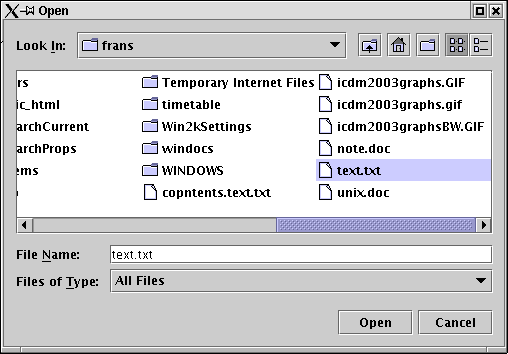
Figure 1: JFileChooser GUI.
|
| 1. File chooser GUI for reading files | |
| 2. File chooser GUI for writing files |
The code in Table 1 creates a GUI which allows the user to select and display text files.
// FILE CHOOSER APPLICATION
// 14 June 2003
// Frans Coenen
// University of Liverpool

import java.io.*;
import java.awt.*;
import java.awt.event.*;
import javax.swing.*;

public class FileChooser extends JFrame implements ActionListener{

    // GUI features
    private BufferedReader fileInput;
    private JTextArea textArea;
    private JButton openButton, readButton;

    // Other fields
    private File fileName;
    private String[] data;
    private int numLines;

    public FileChooser(String s) {
        super(s);

        // Content pane
	Container container = getContentPane();
	container.setBackground(Color.pink);
	container.setLayout(new BorderLayout(5,5)); // 5 pixel gaps

        // Open button
        openButton = new JButton("Open File");
        openButton.addActionListener(this);
        container.add(openButton,BorderLayout.WEST);

	// Read file button
	readButton = new JButton("Read File");
        readButton.addActionListener(this);
	readButton.setEnabled(false);
        container.add(readButton,BorderLayout.EAST);

	// Text area
	textArea = new JTextArea(10, 15);
        container.add(new JScrollPane(textArea),BorderLayout.SOUTH);
        }

    /* ACTION PERFORMED */

    public void actionPerformed(ActionEvent event) {
        if (event.getActionCommand().equals("Open File")) getFileName();
	if (event.getActionCommand().equals("Read File")) readFile();
        }

    /* OPEN THE FILE */

    private void getFileName() {
        // Display file dialog so user can select file to open
	JFileChooser fileChooser = new JFileChooser();
	fileChooser.setFileSelectionMode(JFileChooser.FILES_ONLY);

	int result = fileChooser.showOpenDialog(this);

	// If cancel button selected return
	if (result == JFileChooser.CANCEL_OPTION) return;

	// Obtain selected file

	fileName = fileChooser.getSelectedFile();

	if (checkFileName()) {
	    openButton.setEnabled(false);
	    readButton.setEnabled(true);
	    }
	}

    /* READ FILE */

    private void readFile() {
        // Disable read button
        readButton.setEnabled(false);

        // Dimension data structure
	getNumberOfLines();
	data = new String[numLines];

	// Read file
	readTheFile();

	// Output to text area
	textArea.setText(data[0] + "\n");
	for(int index=1;index < data.length;index++)
	    textArea.append(data[index] + "\n");

	// Rnable open button
	openButton.setEnabled(true);
	}

    /* GET NUMBER OF LINES */

    /* Get number of lines in file and prepare data structure. */

    private void getNumberOfLines() {
        int counter = 0;

	// Open the file
	openFile();

	// Loop through file incrementing counter
	try {
	    String line = fileInput.readLine();
	    while (line != null) {
	        counter++;
		System.out.println("(" + counter + ") " + line);
                line = fileInput.readLine();
		}
	    numLines = counter;
            closeFile();
	    }
	catch(IOException ioException) {
	    JOptionPane.showMessageDialog(this,"Error reading File",
			 "Error 5: ",JOptionPane.ERROR_MESSAGE);
	    closeFile();
	    System.exit(1);
	    }
	}

    /* READ FILE */

    private void readTheFile() {
        // Open the file
	openFile();
System.out.println("Read the file");
	// Loop through file incrementing counter
	try {
	    for (int index=0;index < data.length;index++) {
	        data[index] = fileInput.readLine();
		System.out.println(data[index]);
		}
            closeFile();
	    }
	catch(IOException ioException) {
	    JOptionPane.showMessageDialog(this,"Error reading File",
			 "Error 5: ",JOptionPane.ERROR_MESSAGE);
	    closeFile();
	    System.exit(1);
	    }
	}

    /* CHECK FILE NAME */

    /* Return flase if selected file is a directory, access is denied or is
    not a file name. */

    private boolean checkFileName() {
	if (fileName.exists()) {
	    if (fileName.canRead()) {
		if (fileName.isFile()) return(true);
		else JOptionPane.showMessageDialog(null,
				"ERROR 3: File is a directory");
		}
	    else JOptionPane.showMessageDialog(null,
	    			"ERROR 2: Access denied");
	    }
	else JOptionPane.showMessageDialog(null,
				"ERROR 1: No such file!");
	// Return

	return(false);
	}

    /* ------------------------------------------------------- */
    /*                                                         */
    /*                  FILE HANDLING UTILITIES                */
    /*                                                         */
    /* ------------------------------------------------------- */

    /* OPEN FILE */

    private void openFile() {
	try {
	    // Open file
	    FileReader file = new FileReader(fileName);
	    fileInput = new BufferedReader(file);
	    }
	catch(IOException ioException) {
	    JOptionPane.showMessageDialog(this,"Error Opening File",
			 "Error 4: ",JOptionPane.ERROR_MESSAGE);
	    }
System.out.println("File opened");
	}

    /* CLOSE FILE */

    private void closeFile() {
        if (fileInput != null) {
	    try {
	    	fileInput.close();
		}
	    catch (IOException ioException) {
	        JOptionPane.showMessageDialog(this,"Error Opening File",
			 "Error 4: ",JOptionPane.ERROR_MESSAGE);
	        }
	    }
System.out.println("File closed");
	}

    /* ------------------------------------------------------- */
    /*                                                         */
    /*                         MAIN METHOD                     */
    /*                                                         */
    /* ------------------------------------------------------- */

    /* MAIN METHOD */

    public static void main(String[] args) throws IOException {
	// Create instance of class FileChooser
	FileChooser newFile = new FileChooser("File chooser");

	// Make window vissible
	newFile.setDefaultCloseOperation(JFrame.EXIT_ON_CLOSE);
	newFile.setSize(500,400);
        newFile.setVisible(true);
        }
    }
|
Table 1:Input GUI program
The resulting GUI is shown in Figures 1 and 2. Figure 1 shows the JFileChooser GUI, and Figure 2 the result of "picking" a file.
Figure 1: JFileChooser GUI.

Figure 2: Result of exacuting code presented in Table 1.
The code in Table 2 creates a GUI which allows the user to create a random 2-D array of 16x8 integers and write this to a a file in comma separated format.
// FILE OUTPUT
// Frans Coenne
// Dept Computer Scioence, The University of Liverpool
// 4 August 2003

/* Based on Example given in: Deitel and Deitel (2002),
"Java: How to Program" (4th Ed), Prentice Hall. */

// Java core packages

import java.io.*;
import java.awt.*;
import java.awt.event.*;

// Java extension packages
import javax.swing.*;

public class FileOutput extends JFrame implements ActionListener{

    /* ---------- FIELDS --------- */

    private JButton saveFile, createFile;
    private JTextArea textArea;

    private File fileName;
    private PrintWriter fileOutput;

    int[][] random2Darray = null;
    static final int NUM_RECORDS=16;
    static final int SIZE_OF_RECORD=8;

    /* ---------- CONSTRUCTORS ---------- */

    FileOutput(String s) {
 	super(s);

	// Content pane
        Container container = getContentPane();
        container.setBackground(Color.pink);
        container.setLayout(new BorderLayout(5,5)); // 5 pixel gaps

	// Save button
        saveFile = new JButton("Save File");
        saveFile.addActionListener(this);
        // Create output button
	createFile = new JButton("Create File");
        createFile.addActionListener(this);

        // Text area
	textArea = new JTextArea(40, 15);
	textArea.setEditable(false);
        container.add(new JScrollPane(textArea),BorderLayout.CENTER);

        // Button Panel
	JPanel buttonPanel = new JPanel();
	buttonPanel.setLayout(new GridLayout(1,2));
    	buttonPanel.add(createFile);
    	buttonPanel.add(saveFile);
	container.add(buttonPanel,BorderLayout.NORTH);
	}

    /* ACTION PERFORMED */

    public void actionPerformed(ActionEvent event) {
        if (event.getActionCommand().equals("Save File")) saveFile();
        if (event.getActionCommand().equals("Create File")) createFile();
	}

    /* ---------------------------------------------------------------- */
    /*                                                                  */
    /*                           CREATE FILE                            */
    /*                                                                  */
    /* ---------------------------------------------------------------- */

    private void createFile() {
        textArea.append("CREATE FILE\n-----------\n");

        random2Darray = new int[NUM_RECORDS][SIZE_OF_RECORD];

	for (int index1=0;index1 < NUM_RECORDS;index1++) {
	    for (int index2=0;index2 < SIZE_OF_RECORD;index2++) {
		int value = (int) (Math.random()*100);
		textArea.append(value + " ");
		random2Darray[index1][index2]=value;
		}
 	    textArea.append("\n");
	    }

	// End
	textArea.append("\n\n");
	}

    /* -------------------------------------------------------------- */
    /*                                                                */
    /*                           SAVE FILE                            */
    /*                                                                */
    /* -------------------------------------------------------------- */

    private void saveFile() {
        textArea.append("SAVE FILE\n---------\n");

        if (openFile()) {
	    try {
   		outputToFile();
                }
            catch (IOException ioException) {
	    	JOptionPane.showMessageDialog(this,"Error Writing to File",
			 "Error",JOptionPane.ERROR_MESSAGE);
		}
            }
	}

    private void outputToFile() throws IOException {
        // Initial output
	textArea.append("File name = " + fileName + "\n");

	// Test if data exists
	if (random2Darray != null) {
  	    // Step through records
	    for (int index1=0;index1 < NUM_RECORDS;index1++) {
		// Write integers in record up to last integer
	    	int index2=0;
		for (;index2 < SIZE_OF_RECORD-1;index2++) {
	            fileOutput.print(random2Darray[index1][index2] + ",");
	            }
	    	//Write last integer
		fileOutput.println(random2Darray[index1][index2]);
		}
	    textArea.append("File output complete\n\n");
	    }
        else textArea.append("No data\n\n");

	// End by closing file
	fileOutput.close();
	}

    private boolean openFile () {
	// Display file dialog box
	JFileChooser fileChooser = new JFileChooser();
	fileChooser.setFileSelectionMode(JFileChooser.FILES_ONLY);
	int result = fileChooser.showOpenDialog(this);

	// If cancel button selected return
	if (result == JFileChooser.CANCEL_OPTION) return(false);

	// Obtain selected file
	fileName = fileChooser.getSelectedFile();

	// Dispaly error if invalid
	if (fileName ==  null || fileName.getName().equals("")) {
	    JOptionPane.showMessageDialog(this,"Invalid File name",
			"Invalid File nmae",JOptionPane.ERROR_MESSAGE);
	    return(false);
	    }
	else {
   	    try {
		fileOutput = new PrintWriter(new FileWriter(fileName));
	 	return(true);
		}
	    catch(IOException ioException) {
	    	JOptionPane.showMessageDialog(this,"Error opening File",
			 "Error",JOptionPane.ERROR_MESSAGE);
      		return(false);
		}
	    }
	}

    /* ------------------------------------------------------- */
    /*                                                         */
    /*                         MAIN METHOD                     */
    /*                                                         */
    /* ------------------------------------------------------- */

    /* MAIN METHOD */

    public static void main(String[] args) {
    	FileOutput newFile = new FileOutput("File Output GUI");

	// Make window vissible
	newFile.setDefaultCloseOperation(JFrame.EXIT_ON_CLOSE);
	newFile.setSize(300,500);
        newFile.setVisible(true);
	}
    }
|
Table 2:Output GUI program
The resulting GUIs are shown in Figures 3 and 4. Figure 3 shows the JFileChooser GUI, and Figure 4 the result of "writing" a file.

Figure 3: JFileChooser GUI.
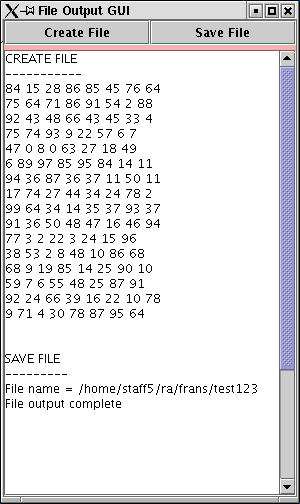
Figure 4: Result of exacuting code presented in Table 2.
|